You can access to website to get link download musuc of 40 website: google video, youtube,ifilm, metacafe, blip.tv, livevideo.com, motionbox.com, soundclick.com, loitraitim.com, putfile.com, sonic.vn, nhacso.net, clip.vn, ....
http://tulieu.net
Tuesday, May 29, 2007
Converter .swf to .exe
You can download software Flash Keeper or Aero SWF.max at address:
http://kimthienlong.googlepages.com/SWF.max.1.5.785.exe
http://kimthienlong.googlepages.com/SWF.max.1.5.785.exe

Porttable Windows XP boot from flash USB
Windows XP Portable is made of Bart PE, it is free and have volumn 48 MB.
You can download at address:
http://tinyurl.com/2vry6p
You can download at address:
http://tinyurl.com/2vry6p
Saturday, May 26, 2007
The Process of Drawing
Getting a Device Context
In order to draw using a device context, you must first declare an HDC variable. This can be done as follows:
HDC hDC;
After declaring this variable, you must prepare the application to paint by initializing it with a call to the BeginPaint() function. The syntax of the BeginPaint() function is:
HDC BeginPaint(HWND hWnd, LPPAINTSTRUCT lpPaint);
The hwnd argument is a handle to the window on which you will be painting
The lpPaint argument is a pointer to the PAINTSTRUCT structure. This means that, the BeginPaint() function returns two values. It returns a device context as HDC and it returns information about the painting job that was performed. That painting job is stored in a PAINTSTRUCT value. The PAINTSTRUCT structure is defined as follows:
typedef struct tagPAINTSTRUCT {
HDC hdc;
BOOL fErase;
RECT rcPaint;
BOOL fRestore;
BOOL fIncUpdate;
BYTE rgbReserved[32];
} PAINTSTRUCT, *PPAINTSTRUCT;
After initializing the device context, you can call a drawing function or perform a series of calls to draw. After painting, you must let the operating system know by calling the EndPaint() function. Its syntax is:
BOOL EndPaint(HWND hWnd, CONST PAINTSTRUCT *lpPaint);
Painting with the BeginPaint() and EndPaint() functions must be performed in the WM_PAINT message.
Starting a Device Context's Shape
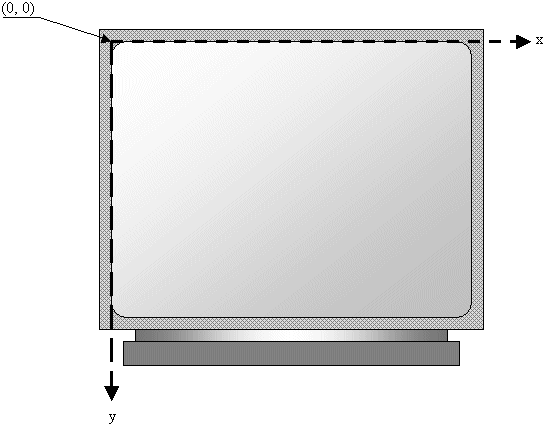
To keep track of the various drawings, the device context uses a coordinate system that has its origin (0, 0) on the top-left corner of the desktop:
Anything that is positioned on the screen is based on this origin. This coordinate system can get the location of an object using a horizontal and a vertical measurements. The horizontal measures are based on an x axis that moves from the origin to the right right direction. The vertical measures use a y axis that moves from the origin to the bottom direction:
This means that, if you start drawing something such as a line, it would start on the origin and continue where you want it to stop.
Introduction to the GDI
The Device Context
Grabbing the Device Context
Imagine you want to draw an orange. You can pick up a piece of stone and start drawing somewhere. If you draw on the floor, the next rain is likely to wipe your master piece away. If you draw on somebody's wall, you could face a law suit. Nevertheless, you realize that, to draw, you need at least two things besides your hands and your imagination: a platform to draw on and a tool to draw with.
As it happens, drawing in a studio and drawing on the computer have differences. To draw in real life, the most common platform is probably a piece of paper. Then, you need a pen that would show the evolution of your work. Since a pen can have or use only one color, depending on your goal, one pen may not be sufficient, in which case you would end up with quite a few of them. Since the human hand sometimes is not very stable, if you want to draw straight line, you may need a ruler. Some other tools can also help you draw geometric figures faster.
A device context is everything under one name. It is an orchestra, an ensemble of what need in order to draw. It includes the platform you draw on, the dimensioning of the platform, the orientation and other variations of your drawing, the tools you need to draw on the platform, the colors, and various other accessories that can complete your imagination.
When using a computer, you certainly cannot position tools on the table or desktop for use as needed. To help with drawing on the Windows operating system, Microsoft created the Graphical Device Interface, abbreviated as GDI. It is a set of classes, functions, variables, and constants that group all or most of everything you need to draw on an application. The GDI is provided as a library called Gdi.dll and is already installed on your computer.
As it happens, drawing in a studio and drawing on the computer have differences. To draw in real life, the most common platform is probably a piece of paper. Then, you need a pen that would show the evolution of your work. Since a pen can have or use only one color, depending on your goal, one pen may not be sufficient, in which case you would end up with quite a few of them. Since the human hand sometimes is not very stable, if you want to draw straight line, you may need a ruler. Some other tools can also help you draw geometric figures faster.
A device context is everything under one name. It is an orchestra, an ensemble of what need in order to draw. It includes the platform you draw on, the dimensioning of the platform, the orientation and other variations of your drawing, the tools you need to draw on the platform, the colors, and various other accessories that can complete your imagination.
When using a computer, you certainly cannot position tools on the table or desktop for use as needed. To help with drawing on the Windows operating system, Microsoft created the Graphical Device Interface, abbreviated as GDI. It is a set of classes, functions, variables, and constants that group all or most of everything you need to draw on an application. The GDI is provided as a library called Gdi.dll and is already installed on your computer.
Grabbing the Device Context
As mentioned already, in order to draw, you need at least two things: a platform and a tool. The platform allows you to know what type of object you are drawing on and how you can draw on it. On a Windows application, you get this platform by creating a device context.
A device context is actually a whole class that provides the necessary drawing tools to perform the job. For example, it provides functions for selecting the tool to use when drawing. It also provides functions to draw text, lines, shapes etc.
HDC: This is the most fundamental class to draw in your applications. It provides all of the primary functions used to perform the basic drawing steps. In order to use this class, first declare a variable from it. Then call the BeginPaint() function to initialize the variable using the PAINSTRUCT class. Once the variable has been initialized, you can use it to draw. After using the device context call the EndPaint() function to terminate the drawing.
A device context is actually a whole class that provides the necessary drawing tools to perform the job. For example, it provides functions for selecting the tool to use when drawing. It also provides functions to draw text, lines, shapes etc.
HDC: This is the most fundamental class to draw in your applications. It provides all of the primary functions used to perform the basic drawing steps. In order to use this class, first declare a variable from it. Then call the BeginPaint() function to initialize the variable using the PAINSTRUCT class. Once the variable has been initialized, you can use it to draw. After using the device context call the EndPaint() function to terminate the drawing.
Thursday, May 24, 2007
Update Symantec Corporation 22/5/2007
You can download at address:
http://definitions.symantec.com/defs/20070522-019-x86.exe
http://definitions.symantec.com/defs/20070522-019-x86.exe
Monday, May 21, 2007
IDE 5.09
You can download Internet download manager 5.09 at address:
http://www.internetdownloadmanager.com/idman509.exe
http://www.internetdownloadmanager.com/idman509.exe
Kaspersky Anti-Virus 6.0.2.621
You can download Trial version of Kaspersky Anti-Virus 6.0.2.621 ( English ) 19.9 MB at:
ftp://dnl-us4.kaspersky-labs.com/trial/registered/IALH5CIN3C6BRF8JWO9X/kav6.0.2.621en.exe
or
http://dnl-us4.kaspersky-labs.com/trial/registered/IALH5CIN3C6BRF8JWO9X/kav6.0.2.621en.exe
or
http://dnl-eu8.kaspersky-labs.com/trial/registered/IALH5CIN3C6BRF8JWO9X/kav6.0.2.621en.exe
or
http://dnl-pr1.kaspersky-labs.com/trial/registered/IALH5CIN3C6BRF8JWO9X/kav6.0.2.621en.exe
ftp://dnl-us4.kaspersky-labs.com/trial/registered/IALH5CIN3C6BRF8JWO9X/kav6.0.2.621en.exe
or
http://dnl-us4.kaspersky-labs.com/trial/registered/IALH5CIN3C6BRF8JWO9X/kav6.0.2.621en.exe
or
http://dnl-eu8.kaspersky-labs.com/trial/registered/IALH5CIN3C6BRF8JWO9X/kav6.0.2.621en.exe
or
http://dnl-pr1.kaspersky-labs.com/trial/registered/IALH5CIN3C6BRF8JWO9X/kav6.0.2.621en.exe
Subscribe to:
Posts (Atom)